
Kaida Rylan Updated on Mar 31, 2025
Table of Contents
TOP VPN
Maintain Your Online Privacy with Falcon VPN
Try NowExodus Redux is compatible only with Kodi v18 (Leia) and is no longer updated or maintained. As a result, streams frequently fail, links may not work, and outdated dependencies could pose security risks. Below, you’ll find step-by-step instructions for installing Exodus on Kodi. However, I strongly suggest opting for one of the recommended alternatives instead. Using an unsupported addon like Exodus can leave your device vulnerable, and the addon itself no longer functions properly, despite being installable. The alternatives I recommend are regularly updated, compatible with the latest Kodi versions, and offer a more reliable and secure streaming experience.
Pro Tip: Use a VPN to Safeguard Your Privacy and Data When Using Exodus on Kodi
Exodus relies heavily on third-party sources, which can expose your IP address and Kodi activity to tracking, malware, and other online threats. Operating independently of Kodi's oversight increases its vulnerability to security risks. Additionally, using Kodi addons often leads to ISP throttling, resulting in poor video quality.

A VPN protects your privacy by masking your IP address and encrypting your internet connection through a secure server. This prevents hackers, advertisers, and even your ISP from monitoring your online activity. Many networks block certain websites or sources, which can trigger the "No streaming available" error on Exodus Redux. A VPN bypasses these restrictions, allowing you to securely access a wide range of Kodi content from anywhere.
If you're looking for a step-by-step guide on how to install Exodus on Kodi, you've come to the right place. Whether you're using a Windows PC, an Amazon Firestick, Kodi for Xbox, or a Xiaomi Mi Box, the process is more straightforward than it might seem—even though there are some specifics you'll need to follow. Below, I’ll break it down so you can configure Exodus Redux and enjoy streaming smoothly.
Prerequisites
Before we begin, note that Exodus Redux is compatible with Kodi 18 (Leia) or earlier versions. Unfortunately, it does not work with Kodi 19 or later. If you have a newer version installed (like Kodi 21), you’ll need to uninstall it first to avoid compatibility issues.
How to Uninstall Kodi
📌 Pro Tip: If Kodi isn’t available in your device’s App Store, you can sideload it. You’ll need the older Kodi Leia version, which can be downloaded from the Kodi mirror site.
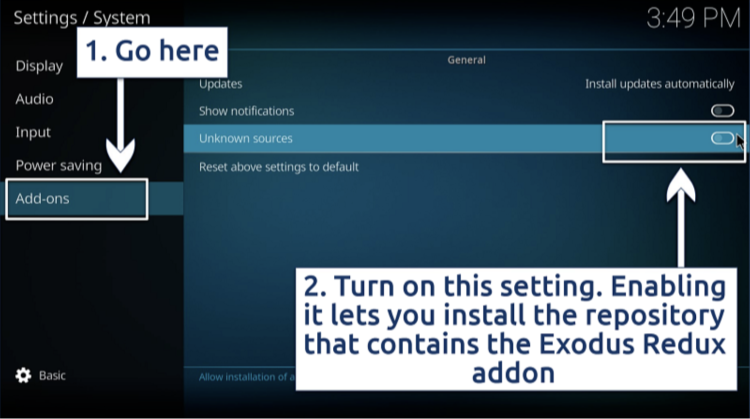
To prepare Kodi for installing third-party add-ons like Exodus Redux, you'll need to enable this setting.
This step allows Kodi to accept unofficial sources, so you can add add-ons like Exodus Redux later.
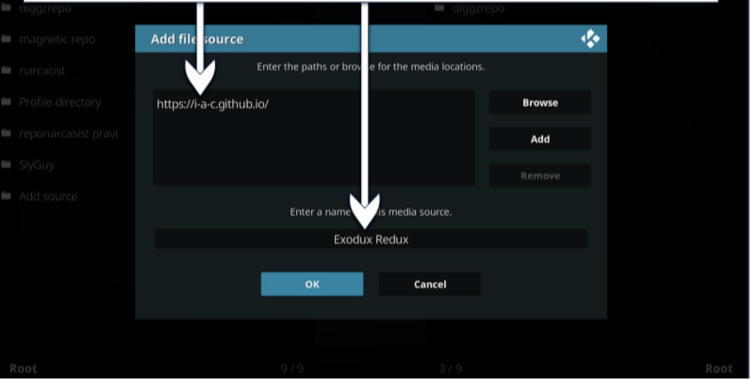
Once your settings are ready, you can link the Exodus Redux repository's source URL.
📌 Pro Tip: If you're reinstalling Kodi, keep your previous settings by avoiding the deletion of the profile folder during uninstallation.
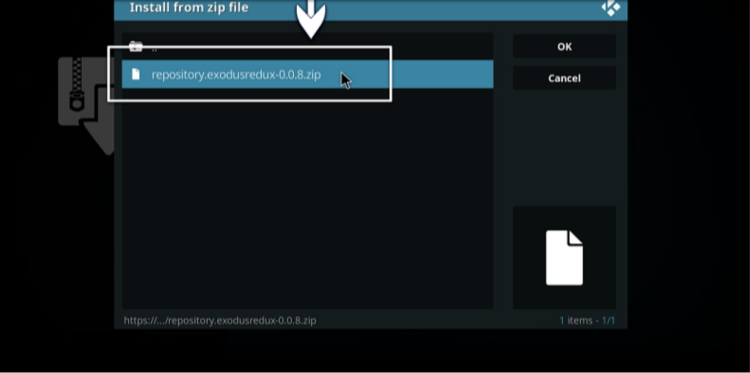
Here, you'll see all the available add-ons in this repository.
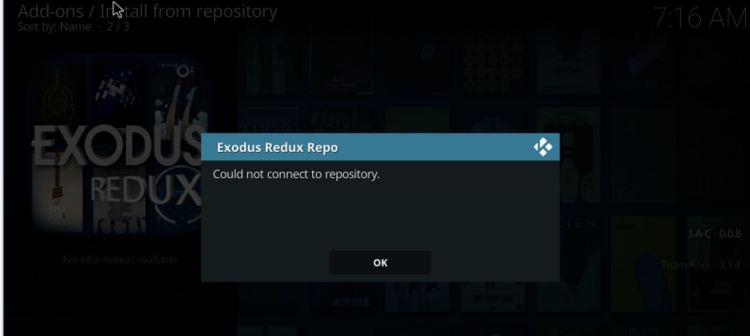
Unfortunately, you may encounter connectivity issues when accessing the repository. If this happens, make sure your internet connection is stable and confirm the repository URL has been entered correctly.
Looking to enhance your streaming experience? Here's how to install Exodus on Kodi using the Git Browser, step by step. With this guide, you'll gain access to one of the most popular Kodi add-ons for all your entertainment needs—including Exodus and Kodi's powerful customization tools. Whether you're curious about Exodus Redux or getting Kodi for Xbox, this walkthrough ensures you’re covered.
Prerequisite: Install the TVAddons Repository
Before you can proceed, installing the TVAddons repository is essential. This repository is required to configure and use the Git Browser on Kodi.
Note: Ensure you're using Kodi 18, as is specifically tailored for Exodus Redux and other compatible add-ons.
Once you’ve added the TVAddons repository, here’s how to install the Git Browser:
Head to “Install from Repository” and select the TVAddons Repository.
Navigate to Program Addons, find Git Browser, and click Install.
Once installed, the Git Browser will allow you to search for and download repositories, including Exodus Redux.
Now that the Git Browser is installed, return to Kodi's home screen:
Go to the Add-ons menu and open the Git Browser.
Click Search by GitHub Username and select New Search.
When prompted, enter the username I-A-C to locate the Exodus Redux repository.
This step ensures you'll have access to downloading and installing Kodi Add On Exodus Redux directly.
Once you've found the Exodus Redux repository, you're just a few clicks away from installation:
Select the Exodus Redux zip file and wait for it to install completely.
If prompted, choose the Install option and follow the confirmations displayed on your screen.
After the repository installation is finished, restart Kodi to ensure all changes take effect.
This step is essential for configuring the installation to work with Exodus and Kodi functionality.
The final step is to install the Exodus Redux add-on and start enjoying your curated library. Here’s how:
After restarting Kodi, head to the main menu and click Add-ons > Install from Repository.
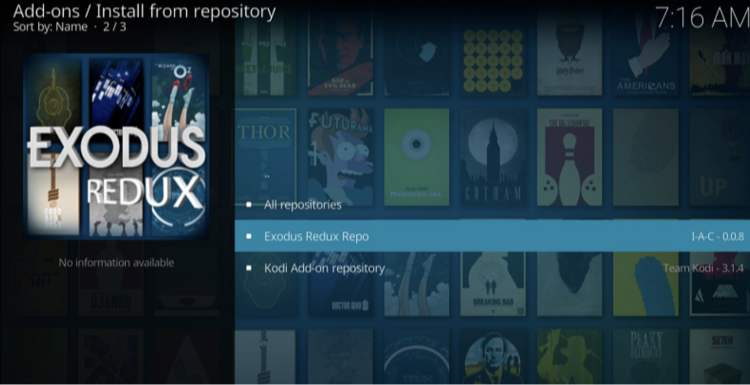
Select Exodus Redux Repo, then Video Add-ons, followed by Exodus Redux.
Click Install, confirm your choices, and wait for the installation to process.
That’s it! Your Kodi Exodus Add On is now ready to use.
While the Exodus addon remains a favorite among Kodi users, here are five high-performing alternatives to elevate your streaming experience:
The Crew stands out for its frequent updates that improve streaming quality and fix buffering. With integrated support for scrapers and multiple sources, this Kodi addon ensures better reliability, even for new releases. Plus, it works seamlessly with Trakt and Real-Debrid to track watched content while offering high-quality streaming links.
Pro Tip: If you experience downtime during peak hours, rest assured that updates usually restore full functionality quickly.
Homelander uses Trakt integration to make personalized suggestions based on your viewing habits. Sync your watchlist, discover new favorites, and access high-quality links with fewer buffer issues.
MORIA offers more than just content; it’s a hub where fans can connect, exchange theories, and share recommendations. Use its curated “Collections” like “Top IMDb” or “Award Winners” to discover something new.
Specifically built for live entertainment, Wolf Pack has a robust selection of sports, concerts, and niche events. While its category layout can be inconsistent, regular updates keep content fresh and interactive for fans who enjoy live viewing experiences.
If you prioritize 4K visuals, Nightwing is a must-try. Its dedicated high-resolution category ensures quick access to the best-quality content, but a reliable internet connection is key for smooth playback.
Note: Always check the legal status of streaming content, as some alternatives may include copyrighted material. Use responsibly!
For those seeking legal and accessible options that rival the Exodus addon, explore these safe picks designed to work well with Kodi:
Stream top BBC channels like BBC One and BBC Two in real time, or catch up with on-demand access to TV shows and documentaries. While it’s geo-restricted to the UK, it’s perfect if you have a valid TV license.
Crackle’s rich library includes a mix of blockbuster classics and impressive original series. While ads interrupt your streams occasionally, the overall variety and quality make it a strong competitor.
Popcornflix delivers a mix of hidden gems and well-known titles, with smooth playback and minimal interruptions beyond occasional ads. Although newer releases are rare, its easy navigation keeps things simple and enjoyable.
Control YouTube effortlessly through Kodi’s interface, ideal for smart TVs or devices like Fire TV Sticks. While ads can be frequent unless you go premium, the expansive user-generated content and professional videos offer non-stop entertainment.
From anime to cult classics, TubiTV’s diverse catalog ensures you’ll never run out of options. Go beyond mainstream content and discover “hidden gems” under its “Not on Netflix” banner.
Exodus Redux is not strictly legal or entirely safe because it relies on unlicensed content and carries certain privacy risks. Streaming copyrighted material without the necessary permissions may violate copyright laws, depending on your country. While some regions focus on targeting providers, others may penalize individuals using this content. To avoid legal consequences, proceed with caution and take measures to secure your device and data. Alternatively, consider legal addons such as YouTube, Plex, or Tubi TV.
It’s worth noting that Exodus Redux is a third-party addon not endorsed by Kodi. The official Kodi repository limits its addons to those that meet legal requirements. Since Exodus Redux operates outside this strict environment, downloading or using it involves potential security vulnerabilities, malware risks, or unverified updates.
For safer browsing, it’s highly recommended to use tools, such as FalconVPN, which protect your identity and online activity.
Here’s a quick step-by-step guide to ensure you can install Exodus Redux on Kodi while minimizing risks.
1. Download from Verified Sources:
Only download Kodi add-ons like Exodus Redux from trusted sources such as its official GitHub repository. Avoid shady download sites or mirror links, as they might include altered or malicious files.
2. Use a Reliable VPN:
Tools like ExpresVPN protect your IP address and encrypt your data, making your browsing activity private and securing your connection. This ensures legal and safe streaming when using Exodus and Kodi.
3. Modify Kodi Privacy Settings:
Go to Settings > System > Logging and turn off data collection for better privacy. Additionally, only enable “Unknown Sources” when installing third-party addons, and disable it immediately afterward to keep potentially risky addons out of your system.
4. Regularly Update Kodi and Addons:
Updates often fix bugs or patch security vulnerabilities. Review your addons regularly by navigating to Addons > My Addons > Check for Updates. This ensures that both Kodi and Exodus Redux are running the latest versions.
5. Implement Network and Device Security:
Turn on your router’s firewall for an extra layer of protection. Installing quality antivirus software also ensures your device is protected from potential threats, such as malware embedded in unofficial addons.
6. Get Familiar with a Sandbox Environment:
For added safety, use a sandbox to isolate Kodi from your main operating system. This extra step can prevent malicious software from affecting other parts of your device.
1. Check Your Internet Connection
For streaming with Exodus Redux, a stable internet connection is essential. If your internet is slow or disconnected, the add-on might not function properly. Consider using a reliable VPN service like ExpressVPN to ensure stable speeds and bypass any ISP throttling.
2.Clear Cache
Corrupted cache data can disrupt the functionality of the Kodi add-on Exodus. Clear the cache to eliminate errors and improve performance. Navigate to:
3.Check Repository Status
Exodus Redux relies on repositories like the Exodus Redux Repository or Kodi Bae Repository. If the repository is unavailable or its URL has changed, the add-on may not work. Ensure you’re using an active and valid repository source.
4.Verify Add-On Dependencies
Exodus Redux requires certain dependencies to function, such as ResolveURL and the Redux Repo. If these are outdated or missing, update or reinstall them to resolve potential issues.
5.Inspect Kodi Logs
Use Kodi’s log feature to uncover specific errors causing issues with Exodus Redux. These logs can provide insights into what went wrong, helping you diagnose and fix the problem faster.
6.Switch Streaming Sources
Some streaming URLs may be blocked or unavailable. Try switching to a different source within the Exodus and Kodi system to access working streams.
7.Use a Reliable VPN
ISPs often throttle speeds, especially during streaming, which can affect performance on Kodi add-ons like Exodus. Using a trusted service like ExpressVPN can bypass these limitations and enhance your streaming experience.
8.Reinstall Exodus Redux
If all else fails, uninstall and reinstall Exodus Redux. Reinstallation can resolve broken dependencies or fix errors that occurred during the initial installation process.
9.Engage with the Community
If none of the steps above work, consult the Exodus Redux user community. Visit online forums or the official community pages to check for ongoing server issues or recent bug fixes. Experts and other users often share solutions for common problems.
By following these steps, you'll improve your chances of getting the Kodi add-on Exodus Redux up and running. Tools like TrustedVPN can also enhance your overall streaming performance, ensuring you get the most out of Exodus and Kodi.
1. ExpressVPN — With lightning-fast speeds and top-tier security features, ExpressVPN ensures a safe and quick installation of Exodus on Kodi from anywhere. All plans come with a 30-day money-back guarantee, allowing you to test it risk-free.
2. CyberGhost— Boasting a vast server network across 100 countries, CyberGhost makes downloading Exodus Redux on Kodi seamless. It also offers servers optimized for streaming platforms like Netflix and Disney+.
3. Private Internet Access (PIA) — PIA’s strict no-logs policy guarantees your data remains private and secure while using Exodus Redux, ensuring your online activity is never stored or shared with third parties.
4.FalconVPN —FalconVPN provides reliable encryption and a user-friendly interface, making it easy to securely access Exodus Redux on Kodi. Its affordable plans and strong privacy features ensure a safe streaming experience.
Yes, the Exodus Redux addon is compatible with Firestick, provided you have Kodi v18 or older installed. To get started, you'll need to tweak your Firestick’s default settings to allow for third-party app installations. This step is essential since Kodi isn’t available on the Amazon Appstore, and Firestick restricts downloads from alternative sources by default. Follow the step-by-step installation guide for a smooth setup.
The Exodus V8 addon is no longer available as it has been discontinued by its developers. However, the good news is that you can install Exodus Redux instead. This addon closely resembles Exodus V8 and offers a similar experience. If you encounter issues during installation, consider checking out other alternatives recommended by the Kodi community. Remember, just like the original Exodus addon, using these addons without precautions can expose your data to online threats. ExpressVPN is a reliable option to keep your online activity secure.
Yes, but if you use a premium VPN like ExpressVPN, the speed reduction will be minimal. All VPNs work by routing your data through an encrypted tunnel, which slightly slows your base internet speed. However, reliable VPNs are optimized for speed, ensuring you can stream content on Kodi without buffering. Investing in a quality VPN will also secure your personal information from any potential breaches.
Exodus Redux is an outdated Kodi addon that has seen little to no maintenance from its developers in recent years. This lack of updates has caused issues such as broken links, outdated content sources, and overall unreliability. For a better experience, it’s worth exploring other Kodi addons that are regularly updated and more dependable for streaming.
You can, but it’s not the best choice for multiple reasons. Free VPNs typically come with limited server options, slower speeds, and bandwidth caps, which can lead to interruptions while using Exodus Redux. Additionally, most free VPNs don’t prioritize user security and may monetize your data by selling it to advertisers or embedding malware into their software. By choosing a premium service like ExpressVPN, you’ll enjoy unrestricted speeds, robust security, and peace of mind.
Using Exodus and Kodi can provide access to a variety of content, but the Exodus Redux addon is no longer a practical option due to its dated and unreliable performance. While many online resources promise to show how to install Exodus on Kodi, these guides often turn out to be ineffective. Throughout repeated tests over the past year, we encountered consistent “Could not connect to repository” errors. Instead of struggling with frustrations, explore other updated addons that work seamlessly on Kodi for Xbox and other platforms. For the best experience, ensure your device is protected with a secure and fast VPN like FalconVPN.
Kaida Rylan is a Junior Writer specializing in VPN reviews and online security. Passionate about technology and digital privacy, Kaida has been researching and testing VPNs to provide readers with honest, in-depth insights. Kaida holds a Master’s Degree in Communications and a Bachelor’s in Media Studies. Additionally, they completed a cybersecurity certification program and gained experience working at a tech startup. Before joining the VPN industry, Kaida worked as a content creator, tech writer, and digital marketing specialist. In their free time, they enjoy exploring new cybersecurity tools and staying up to date with the latest tech trends.