
Kaida Rylan Updated on Mar 31, 2025
Table of Contents
TOP VPN
Maintain Your Online Privacy with Falcon VPN
Try NowIf you’ve been searching for the best free Adobe Acrobat Pro DC alternatives, look no further! While Adobe Acrobat Pro DC remains a favorite in the PDF world, it’s not the only option out there anymore. To help you find the best tools for your needs, I’ve tested dozens of programs to identify an exceptional and free alternative to Adobe Acrobat. But I quickly discovered most "free" options come with limitations, only serving as basic PDF readers. Worse yet, some were riddled with performance issues or flagged as potentially malicious by my antivirus software.
To expand my search, I included freemium tools and free trial programs, provided they didn’t require payment upfront (and no complicated refund process). After thorough testing, I found several standouts, with WPS Office coming in as my top pick. Here’s why:

The free version of WPS Office impressed me with its simple yet robust features. I could highlight, annotate, and leave comments effortlessly. What truly stood out was the ability to edit PDFs without saving interim changes. I could convert the file to a WPS Document, make edits, and then save the final result as a PDF. Want more? Its 7-day free trial also lets you explore premium PDF editor tools without committing financially.
Adobe Acrobat has set the standard for PDF tools since it introduced the file format in 1993. Yet, its complexity can make everyday use challenging for casual users. That’s where finding an Adobe Acrobat alternative free of unnecessary complications becomes essential. Here’s what I look for:
1. Create and Edit PDFs
A great Adobe replacement should offer full editing control. This includes options to modify text, rearrange sections, resize images, and change fonts without hassle.
2. Digitize Documents with OCR Features
Tools with Optical Character Recognition (OCR) capabilities are perfect for decluttering! They allow you to scan documents and save them digitally. Bonus points if they include a mobile app to scan documents on the go.
3. Collaboration Tools
For those working with remote teams (like myself), collaboration is key. I look for tools that support comments, markups, and annotations while maintaining document security.
4. Security Features
Encryption, password protection, watermarks, and digital signatures are all non-negotiable features. After all, protecting sensitive documents is critical.
5. Ease of Use
The interface should be intuitive and clutter-free. WPS Office, for example, gets this right—with clearly labeled menus that make basic tasks like editing, annotating, or converting a breeze. No endless video tutorials required!
Looking for the best free Adobe Acrobat Pro DC alternatives? You've come to the right place. Whether you're editing a PDF, creating a new one, or collaborating with a team, these tools provide powerful features without the price tag of Adobe Acrobat Pro. If you're searching for an Adobe Acrobat alternative free of charge or need a reliable alternative to Adobe Acrobat, here are five excellent options to consider.
Perfect for versatile PDF editing and secure collaboration
WPS Office is a standout Adobe Acrobat Pro free alternative, offering an intuitive interface and professional-grade editing tools.
Top Features of WPS Office:
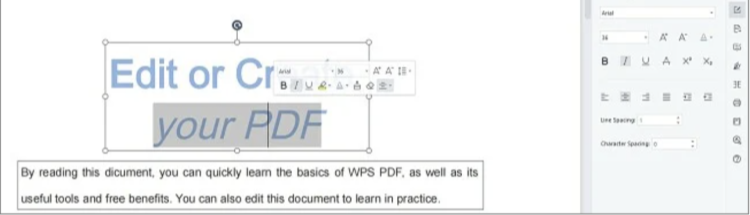

💡 Why Use WPS Office?
Its tabbed design makes multitasking easier. Move between a word processor, spreadsheets, and presentations without leaving the editor. WPS also offers unlimited premium features for 7 days, no credit card required.
Fun Fact: You can protect your work by encrypting files with passwords or watermarks to ensure no one tampers with your PDFs.
Best for intuitive editing and secure file sharing
Soda PDF is a user-friendly alternative to Adobe Acrobat that simplifies PDF editing and conversion. Whether you're annotating pages or merging files, this tool has you covered.
Key Benefits of Soda PDF:
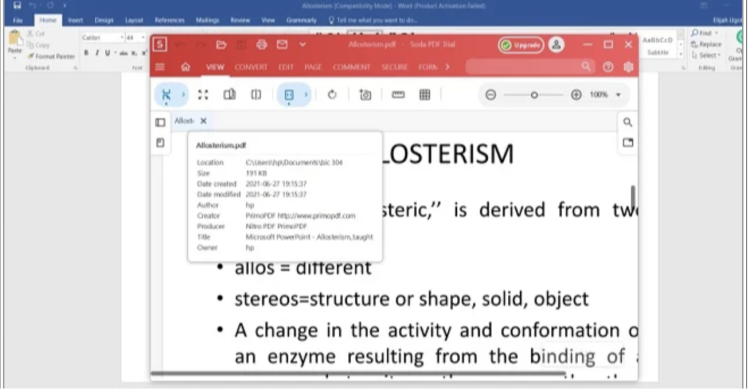
🚀 Pro Tip: Use Soda PDF’s merging tool to combine Word, JPEG, and PowerPoint files into a single PDF. It’s perfect for creating organized presentations.
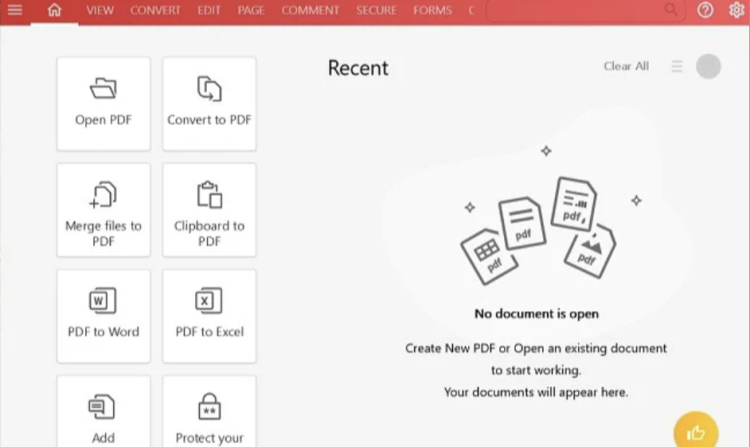
Like WPS, Soda PDF offers a free 7-day trial of premium features with no credit card required.
A reliable tool for collaboration and document formatting
PDF Suite differentiates itself with its simplicity and collaboration tools, making it a solid Adobe Acrobat Pro DC alternative.
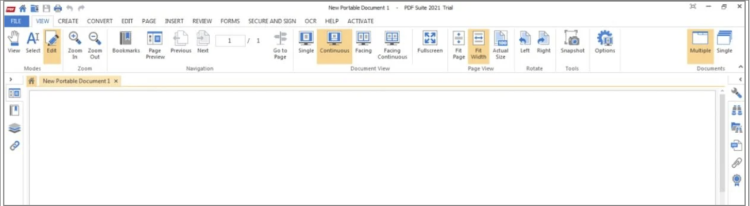
Noteworthy Features of PDF Suite:
✨ Unique Perk: Designers will love the polished interface that mimics Word, making it effortless to create PDFs from scratch. While the free version is mostly a PDF viewer, the 30-day trial provides all the tools you need for editing and collaboration.
Quick and modern solution with versatile tools
Nitro PDF Pro is a powerful alternative to Adobe Acrobat known for its sleek interface and compatibility with 300+ file formats.
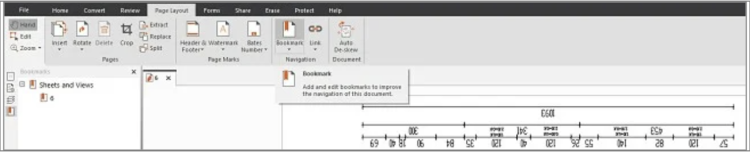
Key Features at a Glance:
🔒 Tip of the Day: Nitro allows encryption and watermarking to secure intellectual property, perfect for sensitive business documents.
Download Nitro PDF Pro to get a 14-day free trial and explore its premium tools.
Digitize and edit printed documents with AI-powered OCR
If your work involves scanning paper documents into PDFs, ABBYY FineReader offers unmatched AI precision and editing control.
Why ABBYY FineReader Stands Out:
❗ Heads-Up: While the OCR feature is its highlight, ABBYY also provides basic editing tools like adding signatures and creating fillable forms. Test these features yourself with a 7-day free trial.
If you’re looking for the Best Free Adobe Acrobat Pro DC Alternatives to handle your tasks more efficiently and affordably, here are some great options worth exploring.
1. WPS Office
Looking for ease of use when creating PDFs? WPS Office is a fantastic alternative to Adobe Acrobat that simplifies the process of creating PDFs from scratch. With its drag-and-drop editor, you can effortlessly build and customize your document. Plus, it comes bundled with a word processor, spreadsheet, and presentation tools, which makes adding multiple types of content into your PDFs seamless.
Key Benefits of WPS Office:
Not to mention, WPS Office doubles as a full-fledged productivity suite, keeping all your document tools in one place.
2. Soda PDF
If document security is your priority, Soda PDF offers some stellar features. It allows you to easily add encryption, secure passwords, and even watermarks. Want to prevent unauthorized copying? Soda PDF makes safeguarding your intellectual property hassle-free.
Key Benefits of Soda PDF:
With these features, Soda PDF is an excellent Adobe Acrobat alternative free option for those who need strong document protection.
3. PDF Suite
If your focus is on creating professional and interactive fillable forms, PDF Suite is a standout choice. It offers complete control over the design and structure of your forms and ensures recipients can fill them out without needing additional software.
Key Benefits of PDF Suite:
PDF Suite is one of the best free Adobe Acrobat Pro DC alternatives for creating dynamic, user-friendly forms while saving both time and effort.
Yes! WPS Office PDF Editor offers robust features for free, including tools to annotate, comment, and even highlight your PDF. The free version is perfect for basic users, while the 7-day premium trial allows you to test more advanced tools like direct content edits.
Both tools have their strengths. While Adobe Acrobat Pro DC excels in real-time collaboration and OCR (Optical Character Recognition), WPS Office is easier to use. Its intuitive design and bundled productivity tools make it an attractive alternative for cost-conscious users.
Soda PDF takes the crown here, with its strong encryption features, password protection, and watermarking capabilities. Whether you're safeguarding sensitive data or protecting intellectual property, Soda PDF is a trusted option.
When searching for the Best Free Adobe Acrobat Pro DC Alternatives, remember that the choice largely depends on your specific needs. Do you want ease of use, security, or robust form-creation tools? Programs like WPS Office, Soda PDF, and PDF Suite offer diverse solutions tailored to each requirement.
Still not sure where to begin? TrustedVPN recommends trying out free alternatives to Adobe Acrobat like WPS Office or Soda PDF for secure and flexible document editing. Explore your options today and find the Adobe Acrobat alternative free solution that works best for you!
Kaida Rylan is a Junior Writer specializing in VPN reviews and online security. Passionate about technology and digital privacy, Kaida has been researching and testing VPNs to provide readers with honest, in-depth insights. Kaida holds a Master’s Degree in Communications and a Bachelor’s in Media Studies. Additionally, they completed a cybersecurity certification program and gained experience working at a tech startup. Before joining the VPN industry, Kaida worked as a content creator, tech writer, and digital marketing specialist. In their free time, they enjoy exploring new cybersecurity tools and staying up to date with the latest tech trends.